Last Updated: Monday March 23, 2026
Submitting the correct photos is essential for a smooth Vietnam eVisa application. Any mistake can lead to delays or rejection. Below are the updated official 2025 photo requirements and common mistakes to avoid.
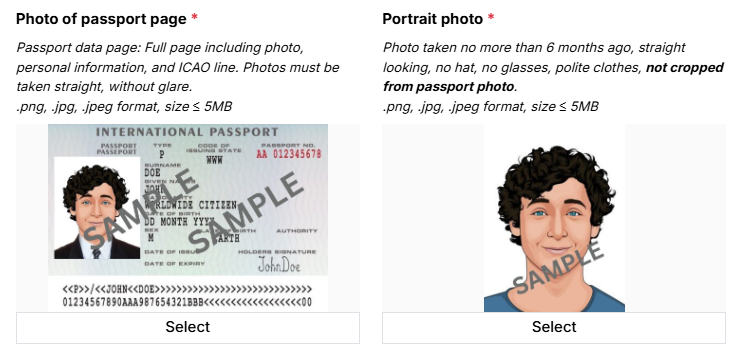
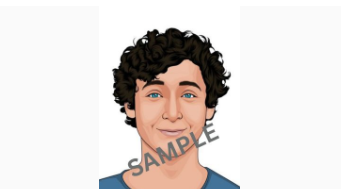
Size: 4 × 6 cm (or 2 × 2 inches)
Format: JPG, JPEG, or GIF (PNG/PDF not accepted)
File size: Under 1 MB (some systems allow up to 2 MB)
Background: Plain white or light-colored, no shadows or patterns
Quality: Color, unfiltered, sharp focus, no glare
Framing: Head and shoulders visible, face forward, neutral expression, mouth closed
Accessories:
No glasses (unless prescription with no glare)
No hats or headwear unless required for religious/medical reasons
Passport Bio Page Photo
Content: Full passport information page, including ICAO machine-readable zone (MRZ) lines
Format: JPG/JPEG, clear resolution, file size up to 2 MB
Tips: Avoid glare, cropping, or reflections. All details must be visible.
Avoid these common errors that often lead to rejection:
Using a cropped photo from your passport → must be a newly taken portrait.
Uploading the wrong file to the wrong field (portrait vs. passport bio page).
Blurry, shadowed, or patterned backgrounds.
Wearing glasses, hats, or accessories that hide facial features.
Infant photos with parents’ hands or objects visible in the frame.
Use reliable tools (Photoshop, Passport Photo Maker, or online eVisa photo crop tools).
Crop to the correct 4 × 6 cm (2×2 inches) size.
Remove glare or busy backgrounds → replace with plain white.
Save final files as .jpg under 1 MB (bio page up to 2 MB).
Avoid using special characters in file names.
|
Requirement |
Details |
|
Photo Size & Format |
4×6 cm or 2×2 inches; JPG/JPEG/GIF; size under limits |
|
Image Quality |
Clear, high-resolution, good lighting, plain background |
|
Framing & Composition |
Head-to-shoulders, neutral expression, no accessories |
|
Passport Page |
Full bio page visible with ICAO MRZ lines |
|
Upload Process |
Portrait = first field; Passport bio = second field |
|
Resizing & Editing |
Use trusted tools, ensure compliance before upload |
For the latest updates, visit our official site: vietnam-immi.org.
Final Tips:
Always take a new portrait photo, not your passport photo.
Double-check file type, size, and correct upload field.
When unsure, re-take or re-crop your photo — better safe than sorry.
Please do not worry: when you apply with us, if your photo does not meet requirements, our team will contact you immediately to update it for you.




 84.379.522.522


